CrewForm
Building a visual workflow canvas for AI agent orchestration
Agent builders & orchestrationAbout the startup
CrewForm is an open-source platform for orchestrating AI agent teams through a web UI. When we first launched, the "What's next" section mentioned an interactive workflow canvas. We shipped it. Here's how it works under the hood. 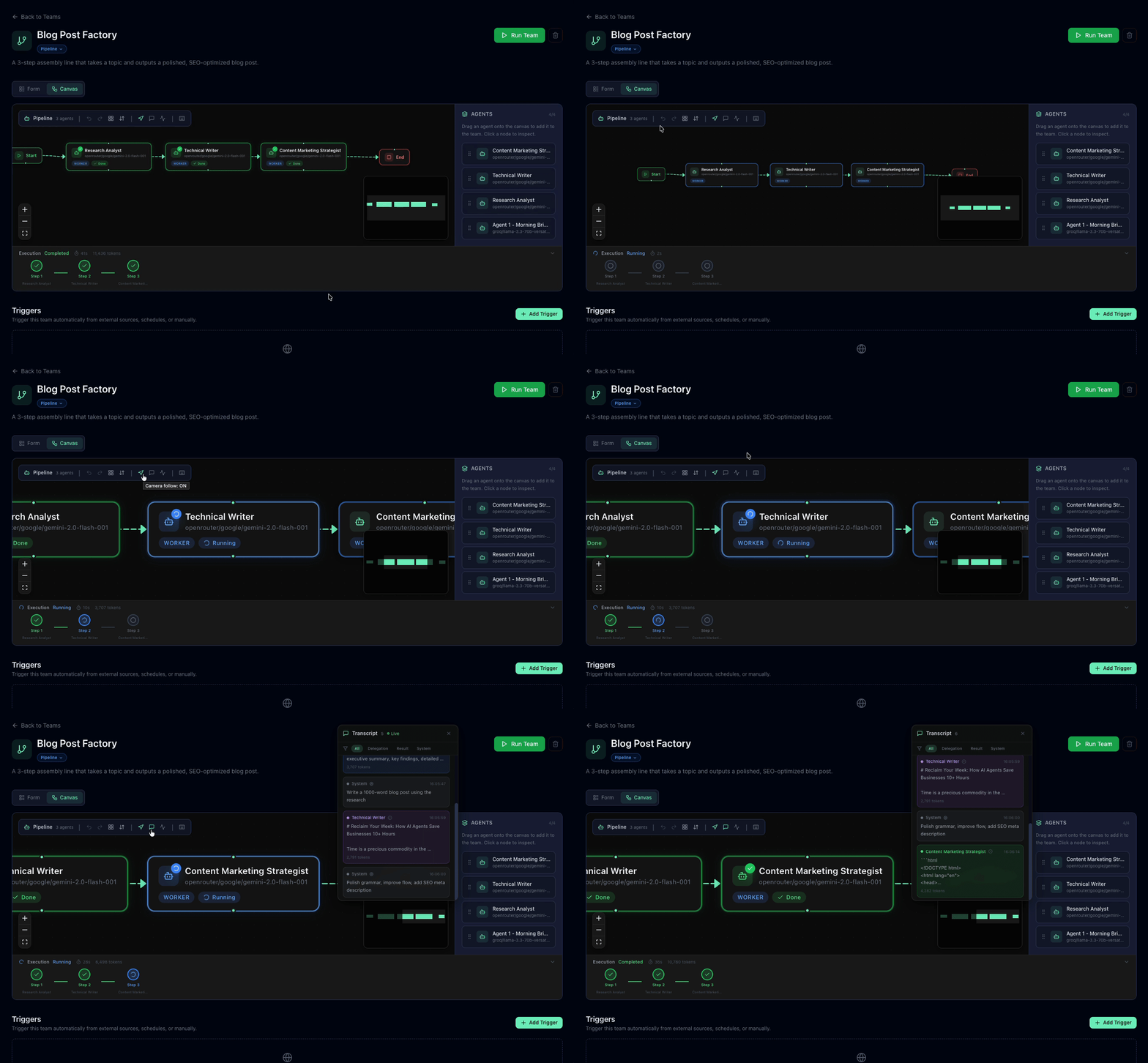 ## The problem In the original version, pipeline teams were configured through a dropdown-based step list. It worked, but it had real limitations: - You couldn't see the full flow at a glance - Rearranging steps meant tedious up/down clicking - Non-technical team members found it confusing - There was zero visual feedback during execution We needed a canvas where agents are nodes, connections are edges, and execution status updates in real-time. ## The stack Three pieces made this work: - **React Flow** — Canvas library. Nodes, edges, panning, zooming, selection, and minimap — all handled out of the box. - **Dagre** — Auto-layout engine. Given a directed graph, it computes x/y positions so nothing overlaps. - **Supabase Realtime** — Live execution state. The task runner pushes status updates, and the canvas highlights the active node instantly. ## Layout system: TB and LR One design decision that took a few iterations: directional layouts. Pipeline workflows naturally flow in one direction. Some people think top-to-bottom (like a flowchart), others think left-to-right (like a timeline). We support both. ```typescript const getLayoutedElements = (nodes, edges, direction = 'TB') => { const dagreGraph = new dagre.graphlib.Graph(); dagreGraph.setGraph({ rankdir: direction, nodesep: 80, ranksep: 100 }); dagreGraph.setDefaultEdgeLabel(() => ({})); nodes.forEach((node) => dagreGraph.setNode(node.id, { width: 220, height: 80 }) ); edges.forEach((edge) => dagreGraph.setEdge(edge.source, edge.target) ); dagre.layout(dagreGraph); // ... map positions back to React Flow nodes }; ``` The tricky part was **edge handles**. React Flow connects edges to specific handles (connection points) on each node — top, bottom, left, right. When you toggle from TB to LR, every edge needs its `sourceHandle` and `targetHandle` swapped: ```typescript function getHandleIds(direction: string) { return direction === 'LR' ? { sourceHandle: 'right', targetHandle: 'left' } : { sourceHandle: 'bottom', targetHandle: 'top' }; } ``` Without this, edges default to the first available handle and you get connections going the wrong direction. Obvious in hindsight — took a few rounds of debugging to catch. ## Inserting agents between steps This was the feature that turned the canvas from a visualisation into a real tool. Right-click any edge → **Insert Agent Here** → pick an agent → done. The new agent splits the edge into two, and dagre re-layouts everything automatically. Under the hood: 1. Remove the original edge (A → C) 2. Insert the new node (B) 3. Create two new edges (A → B, B → C) 4. Re-run dagre layout 5. Animate the transition with `fitView()` Simple in concept, satisfying in practice. ## Real-time execution When a pipeline runs, the canvas comes alive: - The active agent node gets a pulsing highlight - The camera auto-follows the executing node - A side panel streams the live transcript via SSE - Completed steps show a success indicator This is powered by Supabase Realtime subscriptions on the `team_runs` table. When the task runner updates a step's status, the canvas reflects it within milliseconds. ## Persisting layout preferences Small detail that matters: layout direction is saved per-team in the JSONB config column alongside the graph structure. When a user opens a team they set to LR last week, it opens in LR — no reconfiguration needed. One gotcha: we use `useRef` for shared layout state to avoid stale closures in React Flow callbacks. We hit that bug twice before learning the lesson — anything that edges or layout callbacks depend on should live in a ref, not plain state. ## What I'd do differently 1. **Ship the canvas earlier.** The dropdown config was a stepping stone, but users immediately understood the canvas better. Visual-first should have been the approach from day one. 2. **Use refs for callback-dependent state from the start.** React Flow callbacks capture closure values at creation time. If you're using layout callbacks with dagre, reach for `useRef` before `useState`. ## Try it The visual canvas is live and fully open-source: - ⭐ [GitHub](https://github.com/CrewForm/crewform) — star the repo - 🌐 [Live Demo](https://crewform.tech) — try it now - 📖 [Docs](https://docs.crewform.tech) - 💬 [Discord](https://discord.gg/TAFasJCTWs) If you've built anything with React Flow + dagre, I'd love to compare notes. And if you have ideas for the canvas — multi-select, copy-paste node groups, conditional branching — drop a comment or open an issue.
Alternatives to CrewForm
Browse category →Reviewed matches are labeled. Other suggestions come from a shared subcategory, use case, source listing or the same category. Compare features and current plans before choosing.
| Product |
|---|
AgentX 2.0Create your custom cross-platform multi-agent AI team |
Krome AI AgentBuild, connect, and deploy AI agents effortlessly |
Skills LookupDiscover and install open-source AI agent skills |
PulzeBuild AI agents and workflows, no coding needed |
MemMachineBuild Agents that Learn, With Memory that Lasts. |
Celesto AIFastest way to deploy AI Agents with secure integrations |
Starships.aiHire AI agents to scale your business |
Fleece AIAutonomous AI agents for no-code workflow automation |







Related products in Agent builders & orchestration
Browse category →Selected by category and available use-case details. A topic match does not establish equivalent features.
| Product |
|---|
souls.zipProduction-tested AI agent souls and teams |
GoNeuronBuild, publish, & earn from AI agents, starting in minutes! |
LiveContextBuild AI agents and automate workflows without code |
RunAgentSecured, reliable AI agent deployment & integration at scale |
DXT - Find Awesome MCP ServersDXT is leading AI Agent platform. Browse 15,000+ MCP servers |
ClawTraceSub-ms agent orchestration and telemetry |






Recently added in Agent builders & orchestration
Browse category →Added to this directory in the past 30 days. Dates refer to the directory listing, not the product launch.
| Product |
|---|
SkipCallsAI-Powered Voicemail and Call Assistant |
Shinkai: Local AI AgentsBuild AI agents in seconds—private, powerful, and open-source. |
XSAFExtra Small Agent Framework |
QX Labsbuild agents, flows and grids that work across your tools |


Explore expertise in AI & Automation
See all →Profiles grouped by topic. This does not confirm an offer, availability or a connection to this profile.
| Profile |
|---|
Alexander KireyevAI/LLM automation, chatbots & web products · Founder of Timeline Studio · Available for projects |
MAKE MONEY WITH AIWelcome to Make Money With Ai your guide to finding real AI jobs, remote work, online side hustles, and digital income opportunities. |
Prompt Engineer 48🧠 The AI revolution isn't waiting. |
Media about AI & Automation
See all →Shows and channels grouped by topic. A recommendation does not mean this profile was featured or endorsed.
| Show |
|---|
Exploring Language ModelsNewsletter · Maarten Grootendorst |
The Art of the RealizableNewsletter · Maxim Raginsky |
Molecular Modeling ClubNewsletter · Chaitanya K. Joshi |
Founder stories from AI & Automation startups
See all →Retold founder accounts from startups in the same category, each linked to the original.
| Story |
|---|
Wade Foster charged $100 after building the integration a forum asked forWade Foster says Zapier's first paying customer was Mixergy's Andrew Warner, billed $100 into an unfinished beta after Wade found a stale PayPal-to-Highrise plea and then shipped Wufoo-to-AWeber instead, taking the money |
Chatbase's college founder published a $64,000 MRR ladder, not a yearly run-rateYasser Elsaid told Indie Hackers that Chatbase, started as ChatGPT for PDFs, reached $64,000 monthly recurring revenue by 13 May 2023 after a viral tweet, with most cash on a $399 plan. |
FounderPal sold strategies as one-time payments, not subscriptionsSveta Bay says Marketing Strategy Generator brought around $10,000 a month in one-time payments after a second MVP earned $60,000 in six months. Dan Kulkov later said that paid product made around $100,000 in ten months. |
Prompt Genie shipped on a Friday and called 30 days five figures, not MRRKushank Aggarwal says a Carrd-and-PickAxe ChatGPT prompt generator went from idea to first paid user in four days and to five-figure revenue in 30 days via organic TikTok and Instagram, then slowed with wrapper-like chur |


Browse AI & Automation categories
See all →Subcategories in the same part of the directory, with the number of listed products.
| Category |
|---|
AI assistants & chatbots3,823 listed products |
Machine learning platforms542 listed products |
AI models & APIs493 listed products |
Workflow automation & integrations394 listed products |
LLMOps & evaluation194 listed products |